Three-Way Merge for Seed Data Keeps Admin Edits Through Every Upgrade
Every application ships with rows it can’t run without. The roles a new account gets. The permissions behind them. Plan tiers, order states, ticket priorities, the list of countries in a dropdown. Developers call it seed data or reference data, and on day one it’s easy: insert the rows and move on.
Then the second release comes. It adds a permission, renames a plan and fixes a typo in a role’s description. Meanwhile, in every customer’s database, an admin has been busy. One renamed the Editor role to “Content Editor” because that’s what their team calls it. Another took the delete permission away from editors after an accident. A third added a role of their own. Now the upgrade has to change some of those rows, and it has no idea which values anybody touched.
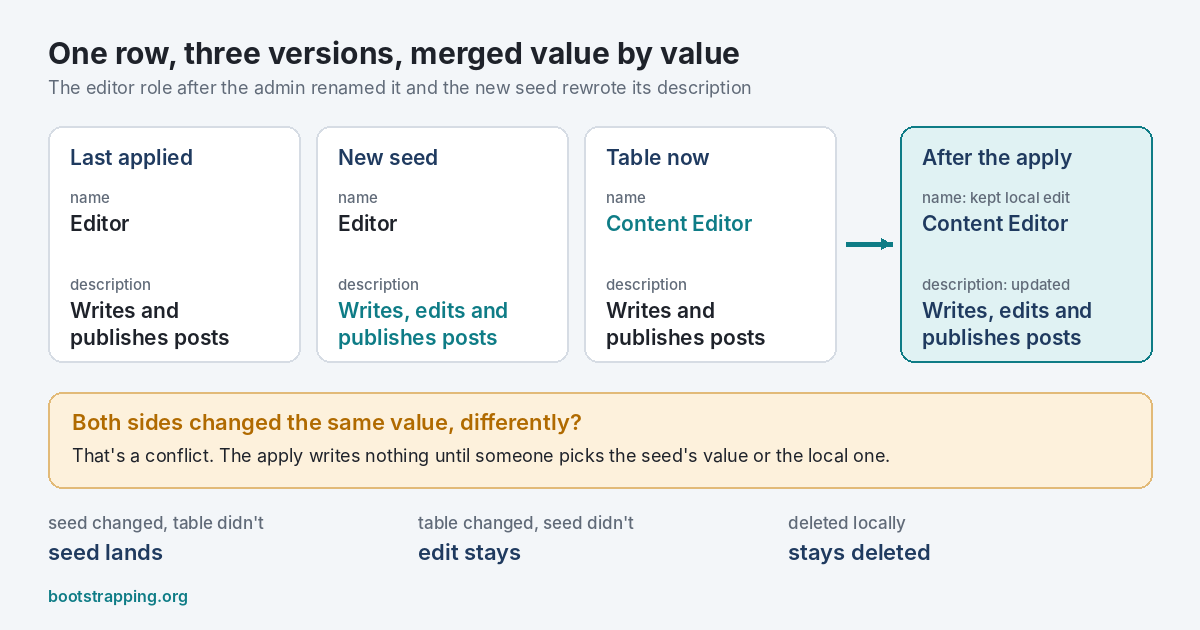 One row, three versions. The description changed only in the seed, the name only in the table, so both changes survive.
Two Ways It Usually Goes Wrong
The common fix is a migration per release, written by hand: update the description, insert the permission, hope nobody renamed anything. It works until someone did. The other fix is to upsert every seed row on deploy. That’s simpler and worse. An upsert sees “Content Editor” in the table and “Editor” in the seed and writes “Editor”, because it can’t tell an admin’s choice from a value the last release left behind. Both look like a difference. Only one of them is a change the seed made.
So teams either overwrite their customers’ edits, which earns a support ticket, or stop shipping changes to reference data at all, which slowly turns the seed files into fiction. Neither is a plan.
What Two Versions Can’t Tell You
The trouble is that comparing two things, the seed and the table, loses the one fact that matters: who moved. A difference between them could mean the seed changed, or the admin did, or both. You need a third version to know. The last seed that was actually applied to this database.
Version control solved this decades ago. A three-way merge compares two edited files against the common ancestor they both started from. A line only one side changed takes that side’s version. A line both sides changed the same way is fine. A line both sides changed differently is a conflict, and a person decides. Bootstrapping applies that rule to database rows, one value at a time, with the ancestor stored in a small ledger table in the same database.
Take the Editor role again. The ledger says the last apply wrote “Editor” for the name and “Writes and publishes posts” for the description. The new seed says “Editor” and “Writes, edits and publishes posts”. The table says “Content Editor” and the old description. The name moved only in the table, so the admin’s name stays. The description moved only in the seed, so the new one lands. Nobody wrote a migration, and nothing anyone chose was lost.
When both sides move the same value differently, say the next release renames Editor to “Editorial”, Bootstrapping doesn’t guess. The apply stops before writing anything and shows the conflict: the old value, the seed’s new one, the admin’s. You settle it once, from the command line or with a rule in the seed file, and the ledger remembers the decision so the same conflict never comes back.
Rows follow the same logic. A row the admin deleted stays deleted, even though the seed still lists it. A row the seed drops can be left alone, deleted or marked retired, and a delete never takes a row someone edited without asking first. Rows the seed never mentioned, like the admin’s own role, are never touched.
Why the Ledger Lives in the Database
The record of what was applied has to sit next to the data it describes. Every customer’s database has its own history: some skipped a release, some were restored from a backup, some had an admin who edited half the roles. A ledger in a deploy server’s memory would be wrong for most of them. Bootstrapping writes the ledger in the same transaction as the rows, so the two can’t disagree, even if the process is killed halfway. The testing post shows 400 applies killed with SIGKILL, every database found exactly as it was or exactly as a finished apply leaves it.
That’s the whole idea. Seed files say what the rows should be. The ledger says what they were last time. The table says what they are now. Three versions are enough to know who changed what, and that’s enough to merge.
The quick start runs the example end to end, and the launch post lists what’s in version 0.1.